Slicer Font: A Modern Condensed Sans-Serif for Designers and Creators
In the ever-evolving world of design, typography plays a crucial role in shaping how information is perceived. One font that has been gaining attention among designers is Slicer. As a condensed sans-serif font family, Slicer offers a unique blend of precision, presence, and modern aesthetics that make it ideal for a wide range of applications—from branding to editorial layouts.
What Is Slicer?
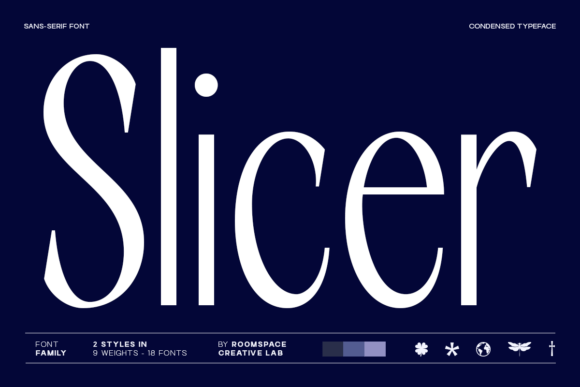
Slicer is a contemporary font designed for those who value clarity, impact, and visual hierarchy in their work. It belongs to the category of condensed sans-serif fonts, which are known for their narrow proportions and clean lines. What sets Slicer apart is its sharp contrast and structured design, making it both bold and highly readable.
The font was created with modern designers in mind—those who need a versatile typeface that can adapt to various design challenges while maintaining a strong visual identity. Whether you're working on a logo, website, or print material, Slicer provides the tools needed to communicate your message effectively.
Key Features of Slicer
- Narrow Proportions: The condensed nature of Slicer allows it to fit more text into smaller spaces without sacrificing legibility.
- Sharp Contrast: The high contrast between thick and thin strokes gives Slicer a striking visual presence, making it stand out in any layout.
- Clean Readability: Despite its bold appearance, Slicer maintains excellent readability even at smaller sizes, ensuring your message is always clear.
- Vertical Rhythm and Tight Spacing: These features help create a balanced and professional look, especially in editorial or web design contexts.
Why Choose Slicer for Your Projects?
In today’s fast-paced digital environment, the right font can make all the difference in how your content is received. Slicer is not just another font—it's a strategic choice for designers looking to make a statement with their typography.
Branding Systems: Slicer’s structured and confident design makes it an excellent choice for logos, brand identities, and other visual elements that need to convey authority and professionalism. Its clean lines and bold presence ensure that your brand stands out in a crowded market.
Editorial Layouts: In magazines, newspapers, and online articles, typography is key to guiding the reader through the content. Slicer’s emphasis on vertical rhythm and tight spacing helps create a cohesive and visually appealing layout that keeps readers engaged.
Web and Mobile Design: With the rise of mobile browsing, responsive design is more important than ever. Slicer’s condensed format makes it ideal for use in web interfaces, app designs, and other digital platforms where space is limited but clarity is essential.
Real-World Applications of Slicer
Let’s take a closer look at how Slicer can be used in different design scenarios:
- Logos and Branding: A minimalist logo using Slicer can convey confidence and modernity. For example, a tech startup might use Slicer in its logo to reflect innovation and precision.
- Magazine Layouts: In a magazine spread, Slicer can be used for headlines and subheadings to create a strong visual hierarchy. Its sharp contrast ensures that readers can easily navigate through the content.
- Website Typography: When designing a website, Slicer can be used for navigation menus, call-to-action buttons, and body text. Its readability and compact form make it suitable for both desktop and mobile views.
- Advertising and Marketing Materials: From billboards to social media ads, Slicer’s bold and modern look can grab attention and reinforce your brand message quickly and effectively.
How Slicer Fits Into Modern Design Trends
Modern design trends often emphasize minimalism, clarity, and functionality. Slicer aligns perfectly with these principles by offering a font that is both aesthetically pleasing and highly functional.
Minimalist Design: Many contemporary design projects favor clean, uncluttered visuals. Slicer’s structured and precise design fits well within this aesthetic, helping to create a sense of order and professionalism.
Responsive Typography: As more users access content on mobile devices, the need for responsive typography has increased. Slicer’s condensed format ensures that text remains legible and impactful across different screen sizes.
High Contrast and Bold Statements: In a world filled with visual noise, standing out is essential. Slicer’s high contrast and sharp edges allow designers to make bold statements without overwhelming the viewer.
Common Misconceptions About Slicer
While Slicer is a powerful tool for designers, there are some common misconceptions about its use:
- Misconception 1: “Slicer is only good for headings.”
Reality: While Slicer excels as a heading font due to its boldness, it can also be used effectively in body text when paired with appropriate spacing and line height. - Misconception 2: “Condensed fonts are hard to read.”
Reality: Slicer is designed with readability in mind. Its tight spacing and vertical rhythm make it easy to read, even in smaller sizes. - Misconception 3: “Slicer is too modern for traditional design.”
Reality: While Slicer has a modern feel, its clean structure and versatility make it suitable for a wide range of design styles, from contemporary to classic.
Getting Started with Slicer
If you're interested in using Slicer in your next project, here are a few tips to help you get started:
- Download and Install: You can download Slicer from font foundries or design marketplaces. Make sure to choose a license that fits your project needs.
- Experiment with Pairings: Try pairing Slicer with other fonts to create a harmonious typographic system. For example, pair it with a more open sans-serif or serif font for body text.
- Adjust Spacing and Line Height: Because of its condensed nature, adjusting the letter spacing and line height can help improve readability and prevent text from feeling cramped.
- Use It Sparingly: While Slicer is bold and eye-catching, it should be used strategically to avoid overwhelming the viewer. Reserve it for key elements like headings and titles.
Conclusion
Slicer is more than just a font—it's a design tool that empowers creators to communicate with clarity, confidence, and impact. Whether you're a designer, developer, or marketer, understanding the strengths of Slicer can help you make better typographic choices in your work.
By embracing Slicer’s structured yet modern aesthetic, you can elevate your design projects and create visuals that resonate with your audience. So why wait? Explore the possibilities of Slicer and discover how it can transform your next creative endeavor.