Scramble: A Dynamic Sans-Serif Font for Creative Expression
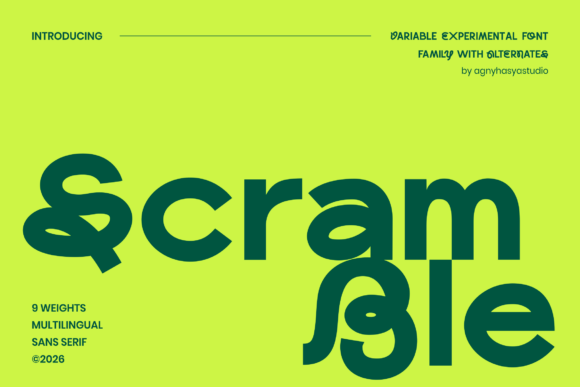
Fonts are more than just tools for communication—they’re the silent architects of your message’s impact. Scramble, a variable experimental sans-serif font, is designed to push boundaries by exploring fluid motion and unconventional letterforms. Its full weight range—from Thin to Black—offers unmatched versatility for bold display typography, creative branding, posters, editorial covers, and artistic projects. But with such flexibility comes the need for careful consideration. Let's explore how to use Scramble effectively and avoid common pitfalls that could undermine its potential.
What Makes Scramble Unique?
Scramble stands out from traditional fonts due to its experimental nature. It’s not just about aesthetics; it’s about movement and transformation. The font’s design encourages dynamic typographic expression, allowing text to feel alive on the page or screen. This makes it ideal for designers who want to break away from conventional layouts and create something truly eye-catching.
Its variable weight feature means you can fine-tune the appearance of your text without switching between multiple font weights. Whether you're designing a poster that needs high contrast or a logo that requires subtle nuance, Scramble offers a seamless solution.
Common Mistakes When Using Scramble
While Scramble opens up exciting creative possibilities, there are several mistakes that users often make when incorporating it into their work.
- Overusing the font: Applying Scramble across all elements of a design can lead to visual clutter. Use it selectively for headlines or focal points instead of body text.
- Ignoring legibility: Because of its unconventional shapes, Scramble may be difficult to read in small sizes or low-contrast environments. Always test readability before finalizing your design.
- Misusing variable weights: While the variable weight feature is powerful, it's easy to overcomplicate your design by using too many variations at once. Stick to a few key weights that complement your overall aesthetic.
- Not checking compatibility: Some platforms or software might not fully support variable fonts. Ensure that Scramble works well with the tools you're using before committing to it for a project.
How to Avoid These Mistakes
To get the most out of Scramble, consider these practical tips:
- Use it as a focal point: Reserve Scramble for headings, titles, or call-to-action buttons where its boldness and uniqueness will shine without overwhelming the viewer.
- Test different weights: Experiment with the variable weight feature to find the right balance between style and readability. Start with a few weights and gradually expand your palette as needed.
- Ensure proper spacing: Variable fonts can sometimes affect letter spacing. Adjust tracking and leading to maintain a clean, professional look.
- Check platform support: Before downloading or purchasing Scramble, verify that it’s compatible with your preferred design software or website builder. Many modern tools now support variable fonts, but older systems might not.
When to Choose Scramble Over Other Fonts
Scramble is best suited for projects that require a sense of movement, experimentation, or a strong visual identity. It’s an excellent choice for:
- Creative branding: Use Scramble to craft logos or brand identities that stand out from the crowd.
- Editorial design: Apply it to magazine covers, book titles, or blog headers to add a touch of dynamism.
- Artistic projects: Whether it's digital art, print media, or web design, Scramble can elevate the visual appeal of your work.
- Posters and signage: Its bold character makes it perfect for large-scale prints where visibility is key.
However, if your project requires a more traditional or formal tone, you may want to opt for a classic sans-serif or serif font instead.
What to Check Before Using Scramble
Before integrating Scramble into your workflow, take a moment to evaluate a few key factors:
- Licensing: Make sure you understand the terms of use, especially if you plan to use it commercially. Some fonts have restrictions on how they can be used.
- File formats: Download the appropriate file format (OTF, TTF, WOFF, etc.) based on your design tool or platform requirements.
- Font pairing: Consider how Scramble will look with other fonts in your design. Pairing it with a complementary font can enhance the overall composition.
- Performance: If using Scramble on a website, check how it affects loading times. Optimize where necessary to ensure a smooth user experience.
Conclusion
Scramble is a powerful tool for anyone looking to infuse their designs with energy, creativity, and personality. By understanding its strengths and limitations, you can harness its full potential while avoiding common missteps. Whether you're a designer, marketer, or creative professional, Scramble offers a fresh perspective on typography—one that can help you stand out in a crowded digital landscape.