Peter Font for Commanding Visuals
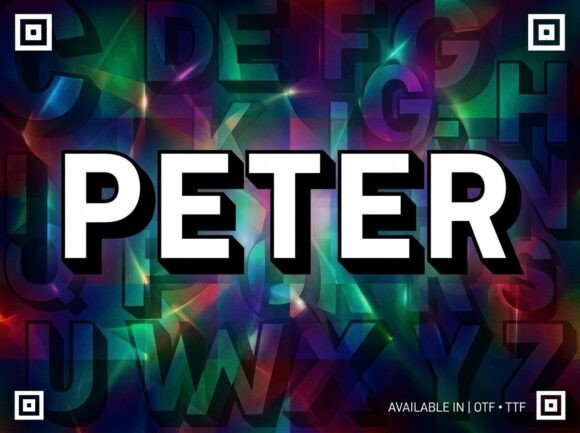
When it comes to making a bold visual statement, the right font can be the difference between being overlooked and commanding attention. Enter Peter, a powerful sans-serif display font engineered for monumental depth. Designed with thick, blocky letterforms enhanced by a crisp 3D drop shadow, Peter brings a cinematic-hero soul to any design. Whether you're crafting an independent film title or designing a high-impact YouTube thumbnail, Peter delivers an authoritative presence that stands out.
What Makes Peter Unique?
Peter is more than just a font—it’s a tool for impact. Its clean, modern geometry and strong structure give it a sense of strength and confidence. The 3D drop shadow adds depth and dimension, making each letter pop against any background. This combination of features makes Peter ideal for situations where you need to grab attention quickly and effectively.
The font's blocky letterforms are not just visually striking—they’re also highly legible even at smaller sizes. This makes Peter versatile enough to be used in both large headlines and more subtle applications like logos or brand elements.
Why Choose Peter?
- Authoritative Presence: Peter exudes confidence and authority, making it perfect for branding that wants to project power and professionalism.
- Cinematic Feel: With its 3D drop shadow, Peter feels like it belongs on a movie poster or trailer, giving your projects a cinematic edge.
- Versatile Use: From YouTube thumbnails to social media headers, Peter works across a wide range of digital platforms and formats.
- Modern Design: The clean lines and geometric shapes align well with current design trends, ensuring your visuals feel fresh and contemporary.
Where Can You Use Peter?
Peter shines in scenarios where boldness and clarity are key. Here are some common use cases where Peter can elevate your designs:
Independent Film Titles: If you're working on a short film or indie production, using Peter as your main title font can instantly give your project a professional and cinematic look.
YouTube Thumbnails: High-impact thumbnails are crucial for video visibility. Peter's strong letterforms and 3D effect make it easy to create eye-catching thumbnails that stand out in a sea of content.
eSports Team Branding: eSports teams often rely on strong, memorable visuals. Peter's bold style fits perfectly with team logos, banners, and promotional materials.
Social Media Headers: Whether you're promoting a product, sharing content, or building your personal brand, Peter can help your social media headers command attention and leave a lasting impression.
Beginner-Friendly Examples
If you're new to typography, here are a few simple ways to start using Peter:
- Create a YouTube thumbnail using Peter for the main title. Pair it with a high-quality image related to your video content.
- Design a logo for a new business using Peter as the primary text element. Add a solid background color to enhance the 3D effect.
- Use Peter for social media posts to highlight important announcements or promotions. Its bold style ensures your message is seen and remembered.
Things to Consider Before Using Peter
While Peter is a powerful font, it's important to consider how it will fit into your overall design. Here are a few tips to keep in mind:
Balance with Other Elements: Because Peter is so bold, it's best to pair it with simpler supporting text or graphics. Overusing it can make your design feel cluttered.
Font Pairing: Experiment with different fonts to find a complementary pairing. A sleek sans-serif or serif font can provide contrast and balance when used alongside Peter.
Color Choices: The 3D drop shadow works best with darker or contrasting colors. Light backgrounds may reduce the visibility of the shadow effect, so test your designs in different environments.
Licensing: Always ensure you have the proper license to use Peter in commercial or public-facing projects. Check the font provider's website for details on usage rights.
Getting Started with Peter
If you're ready to try Peter, start by downloading it from a trusted font provider. Once you have it installed, open your preferred design software—like Adobe Photoshop, Illustrator, or Canva—and experiment with different layouts and styles.
Remember, practice makes perfect. Don't be afraid to play around with spacing, sizing, and color to find what works best for your project. Over time, you'll develop a better sense of how to use Peter effectively in various contexts.
Whether you're a designer, marketer, or content creator, Peter offers a unique way to bring boldness and clarity to your work. With its cinematic feel and strong presence, it's no wonder this font is becoming a favorite among creators looking to make a lasting impact.